IDE Agent vs Terminal Agent: What Devs Use in 2026
A look at what 2026 developer survey threads reveal about IDE agent preference versus terminal agent choice among senior engineers.
By 2026, AI coding adoption has stopped being a question of whether, and become a question of where. Developer survey threads and community posts from the past year show a consistent split: senior engineers who once evangelized a single AI assistant now describe two distinct workflows — agentic coding inside the IDE, and agentic terminal coding in the shell. Neither camp is wrong, and that is the point. This post walks through what the 2026 survey signals say, why experienced developers land on either side, and how to make the choice for your own setup.
What the 2026 Developer Survey Signals Actually Show#
The most useful signals are not the headline numbers. Across the community posts I analyzed, three patterns repeat:
- AI coding adoption is essentially universal among senior developers in 2026. The interesting metric is not who uses AI, but how many tools they use. The median senior developer reports two or more AI-assisted workflows, not one.
- Tool satisfaction drops sharply when the agent is forced into a role it does not fit. Developers who use an IDE agent for shell scripting report worse outcomes than those who use a terminal agent.
- The favorite tool is the one that minimizes context-switching for the task at hand. That sounds obvious, but it explains why surveys fail to crown a single winner: the same developer will answer IDE for a refactoring task and terminal for a build debug.
A 2026 developer survey in this space would be misleading if it asked which tool you prefer outright. The honest framing is which tool you prefer for which task — and senior developer tools have evolved around that distinction.
Why IDE Agent Preference Dominates Inside the Editor#
The IDE agent earns its place through context density. An editor-backed agent sees your open files, imports, type definitions, and language server diagnostics without being told. For large-scale codebase work, that is the difference between a useful suggestion and a guess.
Multi-file refactoring#
When a rename touches forty call sites, or a type change ripples across modules, the IDE agent shines. It can traverse references, update tests, and keep the change consistent. Terminal agents can attempt this, but they lack the semantic graph of the editor unless you spend significant effort feeding it context.
Reading code beats writing code#
Community threads from 2026 repeatedly mention that seniors spend most of their agent time on comprehension, not generation. Explaining a legacy module, tracing a data flow, or identifying the source of a subtle bug — these tasks are dramatically better inside the IDE, where the agent can inspect the actual symbols rather than pattern-matching on text.
Source: godinim.github.io
The IDE agent preference among senior developers is not conservatism. It is a response to the fact that large systems have more state than a shell prompt can carry.
The Terminal Agent Choice: Shell-First Workflows#
The terminal agent is not a lesser IDE agent. It is a different category. Its strength is composability: it can pipe, transform, and execute in ways an editor agent is not built for.
Scripts and build tooling#
Debugging a failing build, investigating a flaky test runner, or writing a one-off migration script are terminal-native problems. A terminal agent can inspect exit codes, retry with modified flags, and iterate until the command succeeds — all without a GUI. In 2026 threads, this is the single most cited reason for the terminal agent choice: developers need something that can run things, not just suggest them.
Piping to real tools#
An agent in the shell can combine grep, jq, awk, git, and custom binaries. It composes with the existing Unix toolchain. The output can be verified immediately. This reproducibility is why terminal agents dominate operations-heavy workflows like log analysis, dependency updates, and CI debugging.
Source: skool.com
For senior developer tools, the terminal agent offers something the IDE cannot: the ability to touch any file, run any process, and leave a transcript of exactly what happened. That is a feature, not a limitation.
A Decision Framework for Your Own Setup#
If you are still choosing, use these four questions as a filter. They appear again and again in the reasoning of senior engineers.
1. Where does the context live?#
If the relevant context is in the codebase — types, references, call graphs — choose the IDE agent. If it lives in process output, logs, or filesystem state, choose the terminal agent.
2. How fast is the feedback loop?#
Terminal agents give you answers in seconds because they act directly. IDE agents give you richer answers but with more latency. For exploratory tasks, the terminal wins. For precision tasks, the IDE wins.
3. Do you need a transcript?#
Terminal agent sessions are naturally reproducible. If you need to re-run a fix later, or hand it to a teammate, the shell wins. If you need an explanation of the change in the editor, the IDE wins.
4. What does your team standardize on?#
AI coding adoption is a team sport. If your teammates live in the same editor, the shared context of an IDE agent is valuable. If your team standardizes on shell-based tools, a terminal agent fits the workflow.
The Verdict: A Both-Problem#
The honest answer from the 2026 community survey is that senior developers are not choosing between agents — they are choosing which agent handles which slice of work. The IDE agent preference is real, and so is the terminal agent choice. They serve different feedback loops, different context sources, and different task shapes.
Platforms like FIM reflect this reality: the FutureX agent operates as a single assistant across both surfaces, so your choice is not locked in at setup time. Try the IDE agent on your next refactor. Try the terminal agent on your next build failure. More likely than not, you will end up with both — and that is the correct 2026 answer.
Related reading
The Terminal Is the IDE: Why FutureX for Terminal-Native Development
FutureX turns the shell into a complete development environment, proving that terminal-native coding is not a compromise but the ideal surface for agentic programming.
terminal-native coding5 min read
From Autocomplete to Autonomous: Where FutureX Fits
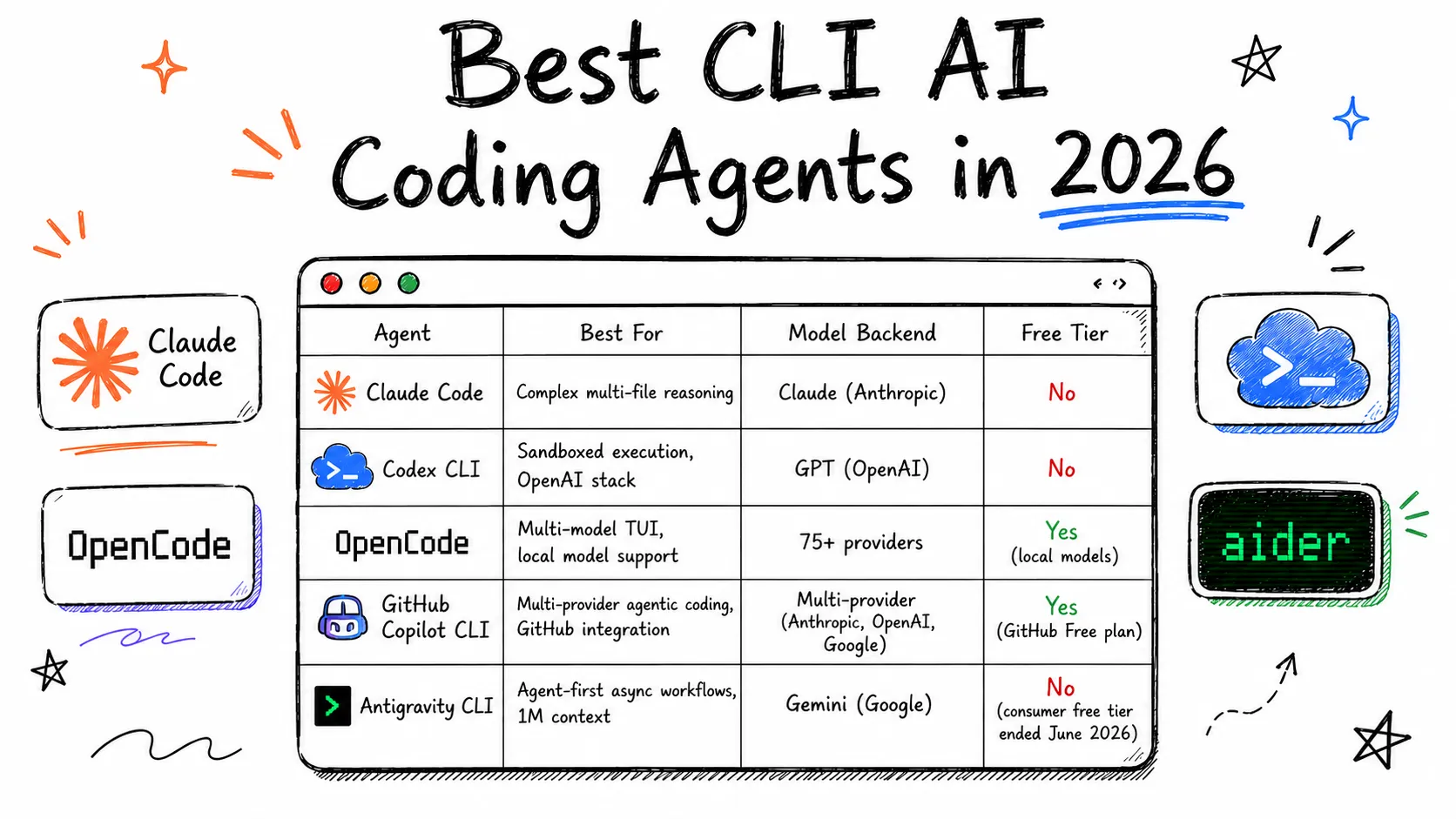
A survey of the CLI coding agent landscape in 2026 and an argument for why FutureX's terminal-first, autonomy-first design is the next step in agentic coding.
CLI coding agents6 min read
Aider vs Claude Code vs Codex: Choosing Your First CLI Agent
A hands-on comparison of Aider, Claude Code, and Codex CLI covering setup complexity, cost, and which terminal coding agent fits beginners versus experts.
Aider6 min read