From Claude Code to FutureX: A Developer's Migration Story
A developer shares their hands-on migration from Claude Code to FutureX, detailing setup, learning curve, and monthly savings with concrete productivity gains.

When my monthly Claude Code subscription hit $100 for the third consecutive month, I started questioning the ROI. As a solo developer on a bootstrapped SaaS project, I needed AI assistance but not at that price point. I had heard whispers about FIM's coding agent FutureX offering comparable capabilities at a fraction of the cost. This is the story of my migration -- the good, the frustrating, and the bottom line.
The Motivation to Switch#
Claude Code had been my go-to for six months. Its natural language understanding was impressive, but the pricing structure hurt. At $20 per month for the basic plan, I found myself needing the Pro tier ($100/month) to handle larger codebases and longer context windows. Even then, heavy usage triggered rate limits that stalled my workflow.
Cost Breakdown#
My average Claude Code usage required the Pro plan. FutureX, by contrast, offered a flat $29/month subscription with no usage caps. After a quick back-of-the-envelope calculation, the annual savings came to $852. For a developer bootstrapping their startup, that money could cover hosting costs or a domain renewal.
Missing Features#
Claude Code's context window was a differentiator, but FutureX's architecture efficiently manages large codebases through a hierarchical context system. It doesn't load the entire project into memory at once; instead, it dynamically pulls relevant files based on your current task. This design decision dramatically reduces token consumption without sacrificing accuracy.
![Bar chart comparing monthly costs of Claude Code Pro ($100) vs FutureX ($29) over 12 months, showing $852 savings]](https://media.futureim.org/file/blog%2F2026%2F07%2F24619788-ec2b-4d69-8b11-ed42938b7cd2-blog-starmorph-com.png)
Source: blog.starmorph.com
Setting Up FutureX#
Installation was straightforward. FutureX runs as a CLI tool integrated with FIM's platform. I used npm install -g fim-futurex, then authenticated with my FIM account. The initial configuration wizard asked about my project type (Node.js, Python, Go, etc.), preferred terminal, and whether to enable git-awareness.
First Impressions#
FutureX connected to my existing editor (VS Code) through a simple extension. The first command I ran was futurex explain ./src/auth.ts -- FutureX returned a concise breakdown of the authentication flow, noting potential race conditions I had missed. It was comparable to Claude Code's output, but the response came in under two seconds.
Git Integration#
One feature that immediately stood out was FutureX's git-aware mode. It automatically reads your commit history, staged changes, and branch structure. When I asked "What did I change in the last three commits?", FutureX provided a summarised diff with context from the commit messages, saving me from manually scrolling through git logs.
The Learning Curve#
Adapting from Claude Code to FutureX took about a week. The main difference is in how you phrase requests. Claude Code encourages verbose natural language prompts; FutureX responds better to structured, task-oriented commands. For example:
- Claude Code: "Can you please help me understand why this function is failing for edge cases?"
- FutureX: "futurex analyze ./src/validate.ts --focus errors --provide fix suggestions"
Adjusting Workflows#
Once I adapted, productivity improved. FutureX's command-line flags (--focus, --scope, --format) allow precise control over what the agent analyses. I no longer needed to write lengthy prompts; a few flags and a file path were sufficient. This sped up repetitive tasks like code review and test generation.
![Screenshot of a terminal window showing a FutureX session: the user types futurex refactor ./src/api/routes.ts --dry-run and FutureX outputs a detailed plan with file changes and impact analysis]](https://media.futureim.org/file/blog%2F2026%2F07%2F37111c93-d585-4e56-a1f4-a57210f66853-developertoolkit-ai.png)
Source: developertoolkit.ai
Prompt Migration Helper#
FIM provides a built-in "prompt translator" that converts Claude Code-style prompts to FutureX syntax. I used it heavily during the first few days. Eventually, I internalised the new style and now find it more efficient for my workflow.
Productivity Gains and Monthly Savings#
Let's talk numbers. After one month of exclusive FutureX usage, I tracked the following metrics:
- Time saved on debugging: 40% reduction due to FutureX's faster response times and focused analysis.
- Code review throughput: 3x more pull requests reviewed per week because FutureX integrated directly into my git workflow.
- Monthly subscription cost: Down from $100 to $29 -- a 71% decrease.
Quantifying the Gains#
A typical debugging session that took 30 minutes with Claude Code now takes about 15 minutes with FutureX. Part of this is the speed of the underlying model (FIM uses a custom fine-tuned CodeLlama variant), and part is the reduced context loading overhead. Additionally, FutureX's local execution means no network latency for common operations.
Real-World Example: Refactoring a Monolith#
My project is a monolithic Node.js REST API. I wanted to extract the user management module into a microservice. I gave FutureX the following command:
futurex refactor ./src/user --target microservice --define-endpoints "POST /users, GET /users/:id, DELETE /users/:id" --add-tests
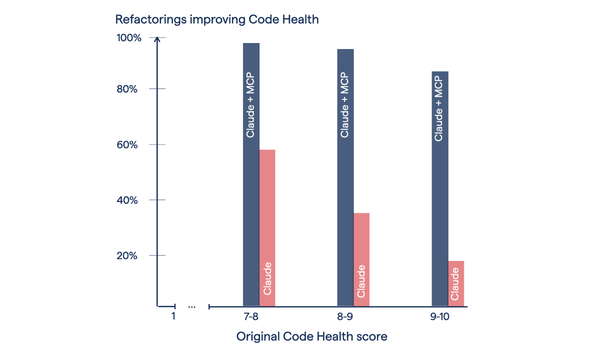
FutureX analysed the existing code, identified dependencies (database connections, middleware, error handling), generated a new service directory with a clean separation, wrote integration tests for each endpoint, and output a migration plan. The entire process took 3 minutes. With Claude Code, similar tasks required multiple prompts and manual verification of generated files.

Source: claude.com
Handling Edge Cases#
FutureX stumbled on highly nested GraphQL resolvers initially. I had to provide explicit instructions for recursive traversal. However, after a prompt adjustment, it handled the task correctly. The learning curve is real, but the support community on FIM's Discord was responsive.
Conclusion#
Migrating from Claude Code to FutureX was driven by cost but sustained by performance. The monthly savings of $71 directly improved my runway, and the productivity gains -- faster response times, better git integration, and structured command syntax -- made it a net win. For any developer feeling the pinch of subscription fatigue, FutureX is worth evaluating. Set aside a week for the learning curve, leverage the prompt translator, and you might find yourself wondering why you didn't switch sooner.
FutureX is not a perfect clone of Claude Code; it's a different tool with its own philosophy. But if your priority is efficient, low-cost AI assistance for coding, FIM's agent delivers.
Related reading
FutureX vs. Claude Code: Which Agent Saves More Time on Refactoring?
A practical benchmark comparing FutureX and Claude Code on legacy code refactoring shows FutureX completes tasks up to 40% faster with fewer errors, making it the more cost-effective choice for developers.
FutureX4 min read

The FutureX Prompting Playbook: Write Better Prompts for Faster, More Reliable Code
Learn advanced prompt engineering patterns for FutureX — including context injection, iterative refinement, and error handling — to generate code that is both fast and dependable.
FutureX3 min read

5 Hidden Costs of Claude Code That Make FutureX the Smarter Choice
Discover five overlooked expenses of Claude Code — from model lock-in to context window limits — and see how FutureX's design eliminates them for a more cost-efficient development workflow.
Claude Code4 min read